

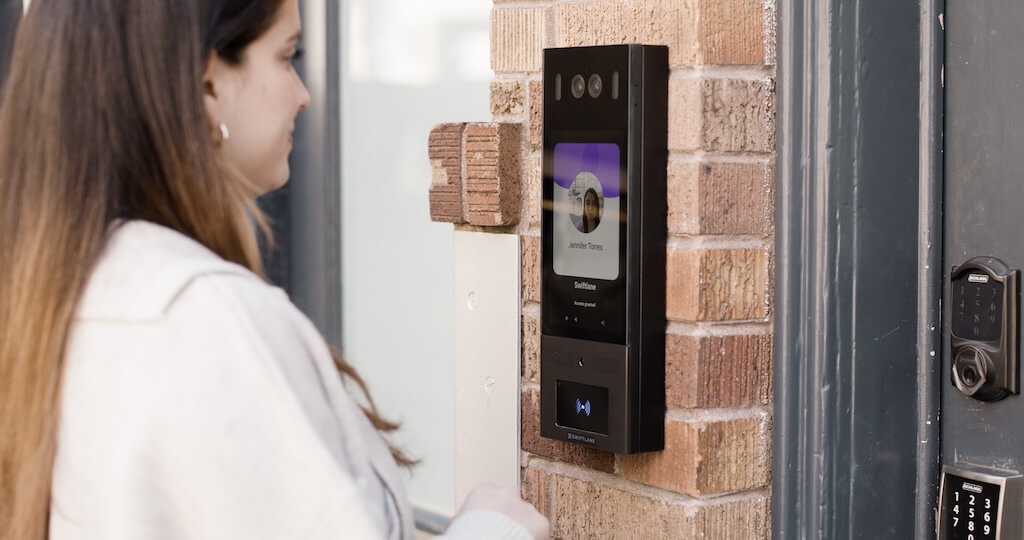
Controlling who can enter the building and when has become more complex than ever. Property teams are managing frequent resident turnover, high delivery volume, multiple entry points, and increasing expectations for convenience and security. Systems that rely on fixed wiring or on-site management often struggle to keep up.
This is why buildings are shifting to IP-based solutions. An IP (Internet Protocol) intercom system connects entry points through a network, allowing tenants or staff to see, communicate with, and grant access to visitors from anywhere. Compared to traditional setups, an IP video intercom system offers more flexibility and better visibility into building activity.
According to SNS Insider, the IP intercom market was valued at $2.04 billion in 2023 and is projected to reach $4.09 billion by 2032, growing at a CAGR of 8.06%.
This guide reflects how IP intercom systems are deployed in real buildings, including infrastructure constraints, installation considerations, and day-to-day operational use.
How We Researched This
This guide compares five IP intercom systems (Swiftlane, Hikvision, Aiphone, DoorBird, Siedle) selected for real-world deployment fit across multifamily, commercial, and luxury/architect-specified properties. Comparisons are based on vendor documentation, installer pricing data, and product specifications, checked as of July 2026.
Cost estimates reflect typical installed pricing and can vary by region, building condition, and installer.
Key Takeaways
- An IP intercom system enables centralized, real-time access control across multiple entry points.
- An IP video intercom system enhances visibility and verification, enabling safer entry management.
- Deployment depends on infrastructure, connectivity, and building layout.
- The right system should align with how your property operates day to day.
Table of Contents
- What Is an IP Intercom System?
- How These Systems Work in Real Buildings
- Types of Intercom Systems
- Best IP Intercom Systems for Buildings
- Where These Systems Work Best
- IP vs Traditional Intercoms: What Changes
- Infrastructure and Installation Considerations
- Cost of IP Intercoms
- What IP Intercom Systems Change Day-to-Day
- Is an IP Intercom System Right for Your Building?
- FAQs
What Is an IP Intercom System?


An IP intercom system is a network-based communication and access solution that connects building entry points via the Internet Protocol. Instead of relying on dedicated wiring between units, it uses Ethernet, WiFi, or cellular networks to transmit audio, video, and access signals.
IP (Internet Protocol)
IP is the transport layer. It defines how data packets are addressed and routed across a network. An IP intercom uses this instead of dedicated analog wiring, which is why it can connect over existing Ethernet infrastructure or the internet.
SIP (Session Initiation Protocol)
SIP is the call-routing protocol that many IP intercoms support. A SIP-enabled intercom can ring VoIP desk phones or a PBX system directly, without a proprietary app. This matters for commercial buildings that already run a VoIP phone system and want intercom calls to route into it natively.
SIP is an IETF-standardized signaling protocol — Cloudflare’s network layer reference covers the underlying concepts well.
PoE (Power over Ethernet)
PoE delivers both electrical power and data through a single Cat5e/Cat6 cable. A PoE switch at the network closet powers the intercom unit at the door. No separate outlet or transformer needed. This simplifies installation considerably, but requires a PoE-capable switch on the network.
PoE is governed by the IEEE 802.3 standard, specifically 802.3af (15.4W) and 802.3at (30W).
Cloud-Managed vs. On-Premise vs. Peer-to-Peer
Cloud-managed systems like Swiftlane route calls and store logs on vendor servers, enabling remote management and over-the-air updates.
On-premises systems keep all data on-site, which is useful where compliance requires it. Peer-to-peer systems connect the door unit directly to a device without an intermediary server, offering low latency but limited scalability across multiple sites.
How These Systems Work in Real Buildings
When a visitor arrives, they use the intercom unit at the entrance to place a call. The system sends that request through the building’s network, whether via Ethernet, WiFi, or cellular, to the intended recipient.
Once verified, they can unlock the door remotely, triggering the connected locking hardware such as an electric strike or magnetic lock.
On the backend, everything is managed through a cloud-based platform. Property teams can:
- Assign or revoke access credentials
- Monitor entry activity in real time
- Review audit logs of who entered, when, and how
- Manage multiple doors or buildings from a single interface
In practice, system performance depends heavily on network reliability, door hardware integration, and the configuration of access rules across the property.
In Swiftlane’s deployments across 200+ multifamily buildings, the most common install blocker isn’t the intercom hardware. It’s outdated PoE infrastructure and incompatible door strikes that weren’t identified during scoping.
Real-world example: A 78-unit apartment building in Austin runs Swiftlane IP intercoms at the lobby, package room, and parking garage. Delivery driver arrives → resident gets push notification → sees live video → taps Unlock → door releases in <3 seconds. Entry logged with timestamp + photo. No staff involved.
Types of Intercom Systems
IP intercom systems are typically categorized based on how users interact with visitors and verify access.
IP Video Intercom Systems


An IP video intercom system allows users to see and communicate with visitors before granting access. These systems are commonly used in multifamily buildings, offices, and gated properties where visual verification improves security and reduces unauthorized entry.
They’re especially useful in buildings with high delivery volume or multiple tenants, where confirming identity before unlocking the door is important. Most modern deployments include mobile app access, allowing users to respond to calls and unlock doors remotely.
Audio IP Intercom Systems


Audio-based IP intercom systems focus on voice communication without video. These are typically used in smaller properties or controlled environments where visual verification is less critical.
While they offer a lower-cost option, they may not provide the same level of security or convenience as an IP video intercom, particularly in buildings with frequent visitor traffic.
Best IP Intercom Systems for Buildings
Below are five systems that stand out based on performance, flexibility, and real-world deployment fit.
1. Hikvision
Hikvision offers a range of IP video intercom solutions commonly used in larger or cost-sensitive deployments. Their systems typically integrate with broader security setups, including CCTV and monitoring systems.
Key strengths:
- Wide hardware selection for different building sizes
- Integration with existing surveillance infrastructure
- Suitable for large-scale or standardized deployments
Limitations:
- Facing expanding U.S. regulatory restrictions: NDAA Section 889 bars federal agencies, contractors, and grant recipients from procuring Hikvision equipment, and FCC restrictions on new and previously authorized equipment have continued to expand through 2026. Confirm current compliance status for your use case before purchasing.
- Software and cloud management experience are more hardware/CCTV-centric than purpose-built cloud intercom platforms
- Less specialized for multi-tenant property workflows (visitor management, tenant self-service) than platforms built specifically for that use case
Best fit: Properties that already use Hikvision for security or need a hardware-focused solution with broader surveillance integrations, and that have confirmed current compliance requirements.
2. Swiftlane
Swiftlane offers a unified IP video intercom system combined with access control designed for buildings that need to manage multiple doors and users from a single platform.
Key strengths:
- Face recognition access with anti-spoofing
- Mobile, PIN, and key card credentials in one system
- PoE setup for simplified installation
- Centralized cloud management across multiple entry points
Limitations:
- Primarily cloud-managed; buildings requiring fully on-premises data control for compliance reasons should confirm this fits their requirements
- Face recognition enrollment requires resident/employee opt-in and clear policy documentation before rollout
- Newer entrant relative to legacy intercom manufacturers, so hardware track record is shorter than decades-old brands like Aiphone or Siedle
Best fit: Multifamily and commercial properties seeking a scalable, all-in-one system that extends beyond entry points and provides full property access control.
3. Aiphone
Aiphone is known for its reliable door intercom systems, particularly in environments that prioritize straightforward communication and durability.
Key strengths:
- Established reputation for reliability
- Simple, structured system design
- Suitable for controlled environments with defined access points
Limitations:
- Access control and credential management (mobile, PIN, cloud-based visitor workflows) are less developed than purpose-built access control platforms
- Cloud and remote management capabilities are more limited than newer IP-native platforms
- Better suited to straightforward communication needs than complex multi-tenant access workflows
Best fit: Smaller commercial buildings, schools, or facilities that need a stable intercom system without complex access control requirements.
4. DoorBird
DoorBird is a SIP-native video intercom designed for smaller deployments of 1–4 doors. It integrates broadly with smart home and building automation platforms and supports both PoE and WiFi connectivity.
Key strengths:
- SIP-native, works with existing VoIP/PBX systems
- PoE and WiFi connectivity options
- Open API with wide smart home integrations (KNX, IFTTT)
- Affordable entry point with HD video
Limitations:
- Designed for smaller deployments (1–4 doors); scaling to larger multi-tenant or multi-building portfolios typically requires a different platform
- No built-in property management console for tenant self-service or centralized multi-building administration
- Access control features are lighter than dedicated access control platforms, functioning primarily as an intercom with basic entry credentials
Best fit: Small commercial properties, boutique offices, or buildings with 1–4 entry points that want smart home integration and a low per-door cost.
5. Siedle
Siedle is a German manufacturer known for high-end, architect-specified intercom systems used in premium commercial and residential projects. Their systems prioritize audio/video quality and durable hardware design.
Key strengths:
- Premium build quality and design-forward hardware
- Strong audio/video performance
- Common in architect-specified and luxury developments
- Long hardware lifespan with modular components
Limitations:
- Premium pricing relative to most alternatives on this list
- Less emphasis on cloud-based remote management and mobile-first workflows compared to newer IP-native platforms
- Narrow best-fit (luxury/architect-specified projects); likely over-built and overpriced for standard multifamily or commercial deployments
Best fit: Luxury residential developments, architect-specified projects, or high-end commercial properties where design quality and hardware longevity take priority over cloud management features.
Head-to-Head Comparison Table
| System | Best For | Connectivity | Architecture | Approx. Cost/Door |
| Hikvision | Large surveillance deployments | PoE | On-prem/cloud hybrid | $500–$1,500 |
| Swiftlane | Multifamily + commercial | PoE/cellular | Cloud-managed | $1,500–$3,500 |
| Aiphone IX | Offices, schools | PoE | On-prem | $700–$2,000 |
| DoorBird | Small commercial (1–4 doors) | PoE/WiFi | Peer-to-peer/cloud | $400–$1,200 |
| Siedle | Luxury/architect-specified | PoE/wired | On-prem | $1,200–$3,000 |
Where These Systems Work Best
IP intercom systems are most effective in environments where access needs to be coordinated across multiple users, entrances, and workflows.
- Multifamily residential: The defining challenges are high volume and turnover, high delivery traffic, frequent guest requests, and residents moving in and out. The system needs to handle a constant churn of temporary and permanent credentials without staff involvement.
- Commercial office: The defining challenge is separation: keeping employee, tenant, and vendor access distinct while still centralizing screening at shared entry points such as lobbies and loading docks.
- Gated communities: The defining challenge is throughput without compromising the perimeter; vehicle and pedestrian entry need to move quickly, and hardware has to hold up outdoors.
- Mixed-use buildings: The defining challenge is coexistence: residential, retail, and office populations share a building but require separate credentials, directories, and access rules, all managed from one platform instead of three.
IP vs Traditional Intercoms: What Changes
The main difference between an IP intercom system and a traditional intercom lies in how the system is connected, managed, and scaled over time.
Traditional intercoms rely on fixed wiring between entry panels and indoor units. This setup can work in stable environments, but it becomes harder to manage as buildings grow, change, or require updates across multiple entry points.
An IP video intercom system, on the other hand, operates over a network. This allows communication and access control to extend beyond a single location, making it easier to manage users, monitor activity, and update permissions without physical changes to the system.
Key Differences at a Glance
| Capability | IP Intercom System | Traditional Intercom |
| Connectivity | Ethernet, WiFi, or cellular | Dedicated wiring between units |
| Access Management | Remote and centralized | Typically on-site only |
| Scalability | Supports multiple doors and buildings | Limited to physical wiring setup |
| Updates and Changes | Software-based, no rewiring | Requires physical modifications |
| Visibility | Video, logs, and activity tracking | Limited or no activity tracking |
In practice, this means an IP door intercom is better suited for buildings that need flexibility, whether that’s adding new users, expanding to more entry points, or managing access remotely. Traditional systems may still be used in smaller or static properties, but they often require more effort to maintain and adapt over time.
Infrastructure and Installation Considerations
Before selecting a system, it’s important to understand how power, connectivity, and door hardware will support the installation.
Network and Connectivity
An IP video intercom system relies on a stable network connection to function consistently. Most deployments use PoE (see the glossary above) for its straightforward install. In cases where wiring is limited, WiFi or cellular connectivity may be used instead, but these setups depend more on signal strength and network reliability.
Retrofit vs New Construction
In existing buildings, installation often depends on what wiring is already in place. Some properties may support a direct upgrade, while others may require adapters or partial rewiring to accommodate a door intercom system.
New construction projects offer more flexibility, allowing systems to be planned alongside network infrastructure and entry hardware from the start.
Retrofit projects in pre-2000 buildings add 20–40% to installation costs when Cat5e cabling needs to be run. Newer construction can often be done in a single day per entry point.
Door Hardware Compatibility
The intercom system must integrate with the building’s locking mechanism. Most commonly, this includes electric strikes or magnetic locks, which are triggered when access is granted.
The choice of hardware affects how doors behave during power loss and how access is controlled throughout the day, making it an important consideration during setup.
Multi-Entrance Planning
Buildings with multiple entry points require a system that can handle different access rules across each location. A centralized IP intercom system allows property teams to manage permissions, schedules, and activity across all doors without treating each entrance as a separate system.
Planning for this early helps avoid fragmented setups and reduces the need for future reconfiguration.
In many deployments, infrastructure limitations such as outdated wiring, weak network coverage, or incompatible door hardware are the primary causes of delays or added costs, making early planning critical.
Cost of IP Intercoms
The cost of an IP intercom system varies based on building size, number of entry points, and installation complexity.
- Per door: typically ranges from $1,000 to $3,500+, depending on hardware and setup
- Total system cost: increases with multiple entrances, wiring conditions, and integrations
- Installation factors: retrofit requirements, network availability, and door hardware can impact overall cost
An IP video intercom system may cost more upfront, but it often reduces long-term expenses by simplifying management and minimizing the need for on-site intervention.
In real-world projects, costs vary significantly depending on the building infrastructure, the number of entry points, and the integration requirements, which is why site-specific evaluation is often necessary.
Cost by Building Size
| Building Size | Doors | Hardware | Install | First-Year Software | Total Est. |
| Small (≤20 units) | 1–2 | $1k–$3k | $800–$2k | $300–$600 | $2,100–$5,600 |
| Mid (20–100 units) | 2–4 | $3k–$10k | $2k–$6k | $600–$1,800 | $5,600–$17,800 |
| Large (100–500 units) | 4–10 | $10k–$30k | $5k–$15k | $1,800–$5,000 | $16,800–$50,000 |
Disclaimer: Cost estimates are illustrative ranges based on typical deployment patterns and Swiftlane’s project history; actual pricing depends on building condition, hardware selection, and vendor quote. First-year software costs are estimated as a proportional share of total project cost and should be confirmed with a vendor quote for your specific building.
Key cost variables: door hardware (electric strike vs. magnetic lock) ranges from $200–$800 per door; cellular connectivity avoids wiring costs but typically carries a higher monthly software fee than PoE deployments.
What IP Intercom Systems Change Day-to-Day
When evaluating an IP intercom system, focus on features that directly impact day-to-day operations, not just what looks good on a spec sheet.
- Mobile access and remote unlock: Manage entry from anywhere without relying on on-site staff or fixed indoor units.
- Video verification (IP video intercom system): See who is requesting access before granting entry; especially useful in high-traffic buildings.
- Access logs and audit trails: Track who entered, when, and how; useful for security reviews and incident tracking.
- Multi-door and multi-building management: Control access across multiple entry points from a single platform.
- Credential flexibility (PIN, mobile, key cards, biometric): Support different access methods depending on user type and building needs.
- Real-time alerts and monitoring: Get notified of unusual activity such as forced entry or a door left open.
IP intercom systems improve access management across a property by reducing manual coordination, increasing visibility, and enabling teams to respond in real time.
Reduces Manual Coordination Across Entry Points
With a centralized system, property managers no longer need to manage access separately for each door or rely on on-site staff for every entry request. Access permissions, schedules, and user credentials can be managed from a single platform, reducing operational overhead.
Improves Response Time for Visitors and Deliveries
Entry requests are handled immediately, even when staff or residents are not physically near the entrance. This helps reduce missed deliveries and unattended visitors.
Increases Visibility into Building Activity
Access logs and real-time monitoring provide a clear record of who entered, when, and how. This makes it easier to review incidents, track usage patterns, and maintain accountability across shared entry points.
Supports Scalable Access Management
As buildings expand or operations become more complex, IP-based systems can accommodate additional users, doors, and locations without requiring significant infrastructure changes.
Simplifies Day-to-Day Operations
By combining communication, access control, and monitoring into a single system, IP intercoms reduce friction for both property teams and tenants. In practice, this leads to fewer interruptions, faster issue resolution, and more consistent access management.
If you’re exploring IP intercom systems for a multifamily or commercial property, Swiftlane offers a unified platform that combines video intercom, access control, and mobile credentials in a single system, designed for multi-door environments and centralized management. Talk to our team!
Before vs. After: Day-to-Day Impact
| Scenario | Without IP Intercom | With IP Intercom |
| Visitor at lobby | Staff walks to door or visitor waits | Resident gets push notification, unlocks remotely in seconds |
| Package delivery | Driver leaves or buzzes repeatedly | Resident opens remotely; entry logged with timestamp + photo |
| After-hours entry | On-call staff required or no coverage | Access rules enforce automatically; alerts fire for anomalies |
| New resident onboarding | Key or fob issued in person | Mobile credential provisioned remotely; revoked instantly |
| Incident review | No record of who entered | Timestamped access log with photo; exportable for investigation |
Is an IP Intercom System Right for Your Building?
An IP intercom system gives building teams more flexible daily interactions. Instead of relying on fixed wiring and on-site coordination, these systems enable real-time access management through a centralized platform.
The right setup depends on how your building operates, how many doors you manage, how often visitors arrive, and how much control your team needs day to day. A well-matched IP video intercom system not only improves security but also simplifies operations and reduces friction for both staff and tenants.
A simple decision framework: If your building has 2 or more entry points, receives frequent visitor or delivery traffic, or is managed by a team that can’t always be on-site, an IP intercom is the practical standard, not a luxury. For a single low-traffic door, a simpler audio system may suffice. For anything larger or more operationally complex, the security and efficiency benefits of an IP video intercom system will outweigh the upfront cost within the first year.
FAQs
Do IP intercom systems work during an internet outage?
Most IP intercom systems rely on network connectivity, but some include local fallback modes that allow basic access functions to continue. This depends on the system design and its configuration.
Can an IP intercom system be used for multiple doors?
Yes, an IP intercom system can manage multiple entry points from a single platform, making it suitable for buildings with several entrances or access zones.
What devices can receive calls from an IP intercom?
Calls from an IP door intercom can be routed to mobile apps, desktop dashboards, or indoor stations, depending on how the system is set up.
Is an IP video intercom system secure?
An IP video intercom system can provide secure access when paired with features such as encrypted communication, user authentication, and activity logging. Security ultimately depends on proper configuration and system design.
What’s the difference between an IP intercom and a SIP intercom?
IP refers to the Internet Protocol. It describes how the device connects (Ethernet, WiFi, or cellular). SIP is the call-routing protocol some IP intercoms use. A SIP-enabled intercom can ring VoIP desk phones or a PBX system without a proprietary app, whereas a non-SIP IP intercom routes calls only through its own platform. Both are IP intercoms; only SIP-enabled devices support direct VoIP phone integration.
What happens during a power or internet outage?
A power outage affects both the intercom hardware and the door locking mechanism. PoE-powered devices go offline unless the switch is on a UPS. Door behavior depends on lock type: fail-safe locks (magnetic) release automatically; fail-secure locks (electric strikes) stay locked. For internet outages specifically, some systems include local fallback modes that allow credential-based access (PIN, key card) to continue without cloud connectivity.
How much does it cost to install in an apartment building?
For a small building with 1–2 doors and fewer than 20 units, the total installed cost typically ranges from $2,100 to $5,600, including hardware, labor, and first-year software. Mid-size buildings (20–100 units, 2–4 doors) typically land $5,600–$17,800. Large buildings (100–500 units, 4–10 doors) can run $16,800–$50,000+. Retrofit wiring and incompatible door hardware are the most common sources of cost overruns, so a pre-installation site assessment is strongly recommended.
Can an IP intercom replace a full access control system?
For building entry points, yes. Many IP intercom systems now include access control features such as PIN codes, mobile credentials, key cards, and facial recognition. For internal door control (office suites, restricted floors, server rooms), a dedicated access control system is typically still required. Some platforms, like Swiftlane, combine both into a single cloud-managed system.
Do IP intercom systems integrate with property management software?
Some do. Swiftlane supports API-based integrations for custom PMS connections. Other systems are largely standalone and require manual user management. If PMS integration is a priority, verify it explicitly before selecting a system. “Open API” does not always mean out-of-the-box PMS sync.
What network infrastructure is required?
For PoE-based systems: a Cat5e or Cat6 cable run from the door unit to a PoE switch, plus a stable internet connection for cloud management. Cable runs up to 100 meters are standard.
Learn More: Swiftlane Swiftreader X
Get in touch with a Swiftlane specialist for more information on the best access control and video intercom solution for your building.


