


A 2 way intercom system (also called a two-way intercom system) lets a visitor and someone inside a building speak with each other in real time. Modern systems often add video, mobile app answering, and remote door or gate release.
That matters because entry decisions happen fast. Someone arrives, requests access, and the person inside needs enough information to decide whether to let them in. A good intercom system makes that process clear, reliable, and secure. A poor one leads to missed calls, tailgating, delivery issues, and avoidable security gaps.
From deployments across 2,000+ buildings annually and retrofit projects in all 50 states, we’ve seen that most intercom problems aren’t caused by hardware failure. More often, they come from weak Wi-Fi coverage, poor call routing, or installation constraints discovered too late.
This guide explains how two-way intercom systems work, the main system types, key features, cost drivers, and how to choose the right setup for your property.
Key Takeaways
- A 2 way intercom system isn’t just a door speaker. The best systems combine visitor communication, remote entry, and access control into a single workflow that’s easier to manage over time.
- Reliability problems are often caused by poor installation planning, weak network coverage, or bad call routing, not the hardware itself. That becomes especially noticeable in retrofit buildings and multi-entrance properties.
- Video, mobile answering, audit logs, and temporary visitor access have become increasingly important in apartments, offices, and gated communities where deliveries, vendors, and remote management are part of daily operations.
- The cheapest intercom system can become the most expensive one later if administration is difficult, support is inconsistent, or the system can’t scale with tenant turnover, staffing changes, and multiple access points.
Table of Contents
- What Is a 2-Way Intercom System?
- How a Two-Way Intercom System Works
- Two-Way Intercom vs Walkie-Talkies, Paging, and Buzzers
- Types of Two-Way Intercom Systems
- Must-Have Features Checklist
- Choosing the Right 2 Way Intercom System
- 2 Way Intercom System Cost Breakdown: What Affects Price?
- Installation and Maintenance Considerations
- Why Choose Modern Intercom Systems Like SwiftReader X
- Frequently Asked Questions
Related Posts
- Wired vs Wireless Intercom Systems for Apartments
- Best Wireless Intercom System for Apartments: Buyer’s Guide
- Wireless Outdoor Intercom Systems
What Is a 2-Way Intercom System?
A 2 way intercom system is a communication system where both sides can talk and listen to each other in real time. That sounds simple, but it’s the key difference between basic door hardware and an actual entry management system.
Instead of just ringing a bell or sending a signal, the system creates a live conversation between a visitor and the person inside. In most setups, this happens between an entry device outside and a receiving device inside. That inside device could be a wall-mounted monitor, a desk station, or a mobile app on a phone.
Common configurations include:
- Door station + indoor monitor
- Gate station + house handset
- Lobby panel + front desk console
- Entry panel + smartphone app
- Multi-tenant directory + resident phones
The “two-way” part matters because it enables verification before access. Someone can explain who they are, and the responder can make an informed decision instead of guessing based on a buzz or missed call.
Use Cases: Where Two-Way Intercom Systems Are Used
Two-way intercom systems show up anywhere controlled entry is needed.
- Homes. Front doors, driveway gates, side gates, garages, and detached structures like guest houses or studios.
- Offices and commercial buildings. Lobby entrances, staff-only doors, loading docks, and after-hours access points where visitors need screening.
- Warehouses and industrial sites. Truck gates, loading bays, fenced perimeters, and delivery check-in stations where both security and coordination matter.
- Apartments and multifamily buildings. Main entrances, package rooms, parking access points, amenity areas, and secondary service doors. These multifamily environments often need directory-based calling and multi-user routing.
According to the 2024 NMHC/Grace Hill Renter Preferences Survey of 172,703 renters, 65% of apartment residents are interested in or won’t rent without video doorbell/intercom access. And they’re willing to pay an average of $49/month in premium rent for it. [1]
What a Two-Way Intercom Is Not
A two-way intercom is often confused with other communication tools that look similar on the surface but behave very differently.
- Not walkie-talkies. Walkie-talkies are portable radios used for staff coordination. They aren’t tied to a fixed entry point and don’t support visitor verification or controlled access.
- Not paging systems. Paging systems broadcast messages to groups. They’re one-way by design and not intended for private conversations or entry decisions.
- Not a basic buzzer system. Many buzzer systems simply trigger a ring and unlock function with limited context. They often lack video, audit logs, mobile answering, and reliable identity verification.
If you’re evaluating door entry security, look for an intercom system that integrates with access control and supports remote unlock.
How a Two-Way Intercom System Works
At its core, a two-way intercom system follows a predictable flow that works across homes, office buildings, and multifamily properties.
A visitor arrives at a door or gate. They initiate a call using a button, directory search, QR code, keypad entry, or sometimes a mobile-based call-in option. The system routes that request to the right destination, which could be a resident’s phone, a front desk station, a security office, or a mobile app.
Once connected, a live conversation takes place. This is where verification happens. The responder confirms identity, asks clarifying questions, or checks the purpose of the visit. Based on that interaction, access is either granted or denied.
If access is approved, the system triggers a relay that unlocks a door or gate through an electric strike, magnetic lock, or gate operator. If not, the entry remains secured. Many systems also log the event automatically, capturing timestamps, call history, and in video-enabled setups, short clips or snapshots.
In deployments we’ve observed across multifamily and commercial sites, the verification step is where most operational issues surface. Calls are either routed incorrectly, or responses are delayed because ownership and response responsibility aren’t clearly defined.
Key Components of a Two-Way Intercom System
- Entry station. Installed at the door or gate. It includes a microphone, speaker, and call interface. Many modern units also include a camera or keypad for identification and access options.
- Indoor station or monitor. A wall-mounted screen, desk console, or handset used to answer calls inside the building. Some setups skip this entirely in favor of mobile answering.
- Mobile app or cloud calling. Routes intercom calls to smartphones or tablets. This is common in modern systems where staff or residents aren’t always on-site.
- Access control hardware. This is what physically unlocks the entry point. It can be an electric strike, magnetic lock, or gate operator controlled through a relay connection.
- Network and power. Systems may run on PoE, low-voltage wiring, Wi-Fi, cellular, or a hybrid setup depending on site requirements and reliability needs.
Common Integrations
Most modern installations go beyond basic calling and unlocking.
Common integrations include:
- PIN, RFID, fob, or mobile credential access
- Security cameras or VMS platforms for video recording
- Property management systems, especially in multifamily buildings
- Visitor management tools for temporary or scheduled access
These integrations help turn a simple intercom into a full entry management system rather than just a communication device.
Two-Way Intercom vs Walkie-Talkies, Paging, and Buzzers
Different communication tools get grouped together, but they solve very different problems. A two-way intercom is designed for controlled entry and verification. The others are mostly general communication tools.
Intercom vs Walkie-Talkies
Walkie-talkies work well when staff are moving across a site. Security guards, warehouse teams, and maintenance crews use them to coordinate across distance. But they aren’t built for structured entry control.
A fixed entrance needs something more reliable and auditable.
A two-way intercom is better when you need:
- A permanent entry point
- Visitor identification before access
- Remote door or gate release
- Call logs or activity records
Walkie-talkies do none of that well. They’re fast, but informal. There is no built-in verification step at a door.
Intercom vs Paging Systems
Paging systems are one-way by design. They broadcast information to multiple people at once. You see this in schools, warehouses, or retail environments for announcements.
Intercoms are the opposite. They support a back-and-forth conversation.
That difference matters at entry points. If someone is trying to get inside, you need:
- Identity confirmation
- Conversation before access
- Decision-making in real time
Paging systems can’t support that workflow.
Intercom vs Traditional Buzzers
Traditional buzzer systems are still common in older buildings. They typically let a visitor ring a unit and request entry.
They often fall short in modern environments:
- Limited or poor audio clarity
- No video verification
- No mobile answering
- Minimal or no access logs
- Difficult tenant updates
- Limited incident visibility
They function, but they aren’t designed for modern security or remote management needs.
Intercom vs Access Control: Which Do You Need?
This is one of the most common points of confusion.
Choose an intercom when:
- Visitors regularly arrive
- Entry requires approval
- Remote answering is needed
- You want a better front-door experience
Choose access control when:
- Users are known and credentialed
- Staff enter daily using fobs, key cards, or mobile access
- You need schedules and permissions
- You need audit trails for employees or tenants
Use both when:
- Apartment or multifamily buildings
- Offices with both visitors and employees
- Warehouses with drivers plus staff access points
- Gated properties with mixed access needs
In most commercial buildings, these systems aren’t either-or. They work best together: Intercom for visitors, access control for authorized users.
Types of Two-Way Intercom Systems
The best intercom type depends less on branding and more on how your property operates. Start with the use case, then match the technology.
Audio-Only vs Video Intercom
Audio-only systems can still be the right choice in simple environments. They’re often enough when:
- Budget is tight
- Visitor traffic is low
- The entrance is low risk
- Users already know most visitors
- Visual verification isn’t important
Video is usually worth the upgrade when daily operations involve unknown visitors or remote answering.
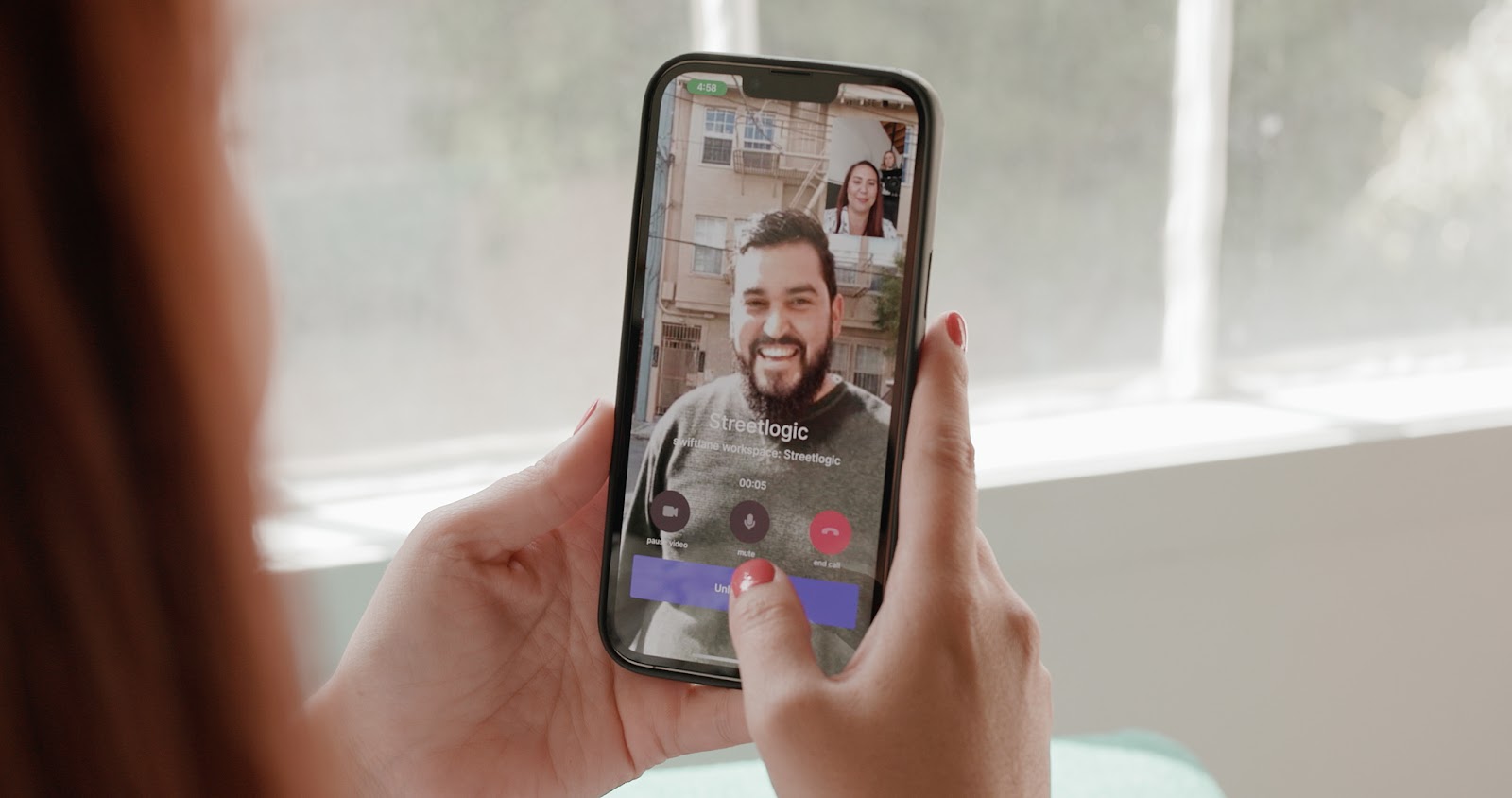
Choose video intercoms when:
- Deliveries are frequent
- You want to verify identity visually
- Tailgating is a concern
- Staff answer calls from mobile devices
- Security incidents may need review later
For many buyers, video becomes the practical choice once they consider missed deliveries, package theft, or after-hours access.
Wired vs Wireless Intercom
Wired systems usually offer stronger reliability because they depend less on signal quality and battery limitations. They’re often the better fit for new construction, renovations, or buildings with existing low-voltage cabling.

Wireless systems can reduce installation time and cost, especially where trenching, conduit work, or wall access would be expensive.
Three wireless watch-outs:
- Weak Wi-Fi near gates, garages, or exterior walls
- Latency during calls or unlock commands
- Congestion or interference in busy networks
From deployments we’ve reviewed across retrofit buildings, wireless systems tend to perform well in smaller residential setups, but become less consistent in larger properties with multiple exterior entry points or heavy RF congestion.
Wireless can work well when properly designed and site-tested. It tends to fail when teams assume indoor Wi-Fi coverage extends reliably to exterior entrances.
For a deeper dive, read our guide on wired vs wireless intercoms.
IP Intercom vs Analog vs Cloud-Based
- Analog / traditional. Simple and familiar, but often limited in scalability and remote features.
- IP intercom. Runs on the network, supports multiple endpoints, and usually integrates better with access control or cameras.
- Cloud / app-based. Strong for remote answering, centralized management, and distributed teams. Recurring software fees may apply.
The global video intercom market reached an estimated $23.9 billion in 2023 and is projected to grow at 13.6% annually through 2030, driven primarily by demand for IP-based and cloud-managed systems in commercial buildings. [2]
Single-Family vs Multi-Tenant Intercom
Single-family setups are usually straightforward. One entrance, one household, limited user management.
Multi-tenant buildings need more:
- Directories
- Tenant permissions
- Multiple entrances
- Package room workflows
- Temporary visitor access
- Fast move-in and move-out administration
That management layer is where many low-cost systems fall short over time.
Must-Have Features Checklist
A separate Deep Sentinel 2024 survey (1,000+ U.S. renters) found 71% of apartment residents believe building management should do more to enhance safety, making controlled entry a direct factor in tenant satisfaction and retention. [3]
Not every feature matters equally. Focus first on the functions people use every day, then on advanced extras. A long feature list means little if calls are unclear or doors fail to unlock reliably.
Core Communication Quality
Audio quality is the foundation of any intercom. If visitors and occupants can’t understand each other, the system creates friction instead of solving it.
Look for:
- Clear speaker volume outdoors
- Noise reduction for traffic or wind
- Echo cancellation
- Low call delay
- Reliable microphone pickup
Poor audio defeats the entire purpose of an intercom. In real property deployments, audio quality shows up as one of the most common post-installation complaints when they’re under-specified during procurement.
Door or Gate Release
If the system controls entry, release performance matters as much as communication.
Prioritize:
- Support for electric strikes, mag locks, or gate operators
- Fast and consistent trigger response
- Configurable unlock timing
- Safe fail-secure or fail-safe behavior where required
- Tamper-resistant exterior hardware when appropriate
Visitor Routing and Directory
Calls should reach the right person quickly.
Useful features include:
- Search by name or unit
- Multiple recipients per call
- Reception desk plus mobile backup
- After-hours routing rules
- Separate routing for deliveries or vendors
Mobile Answering
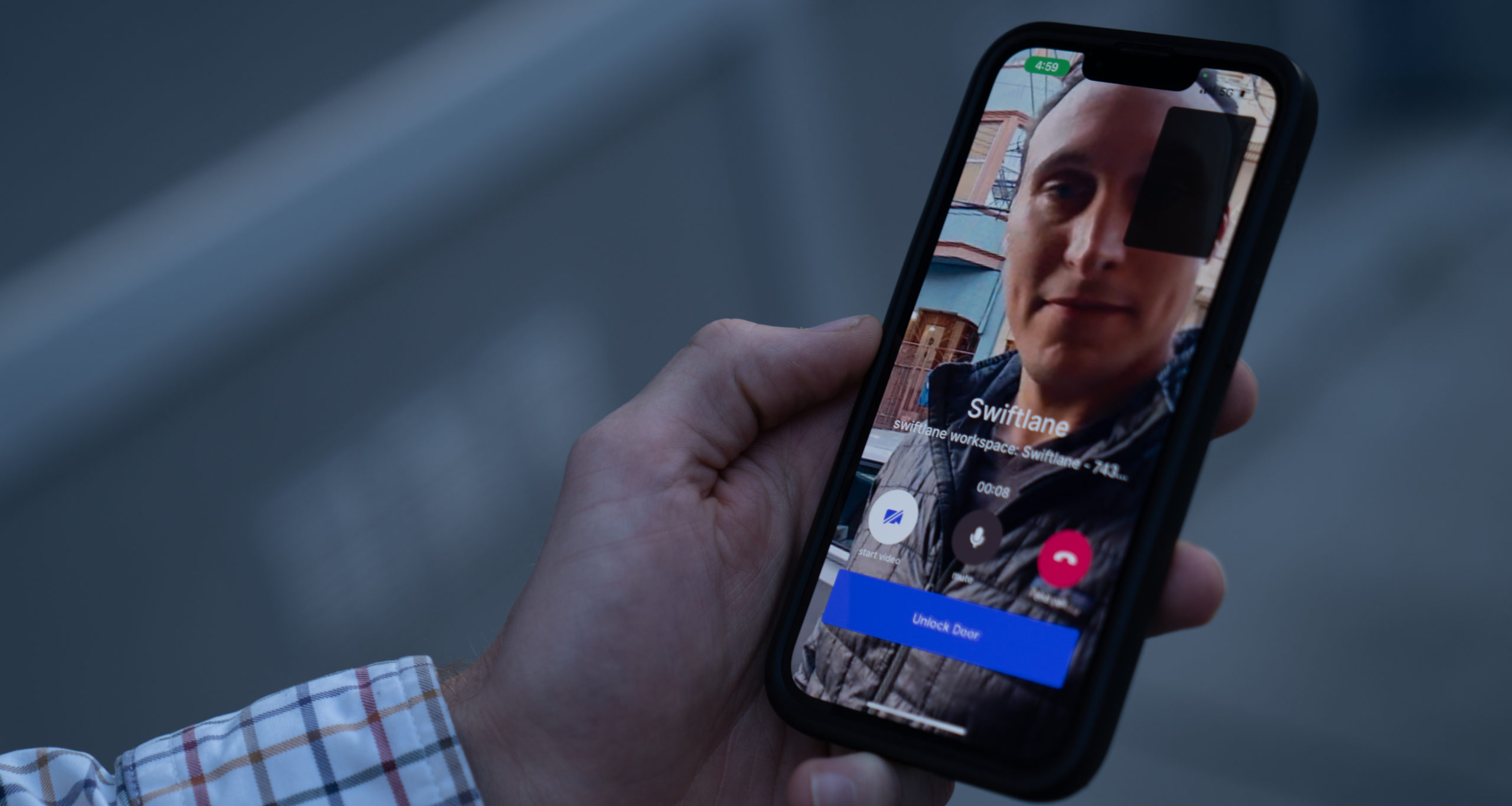
For many buyers, this is now essential. Among renters, 67% said they’re interested in or won’t rent without keyless smart access [4] — a trend that makes mobile intercom answering increasingly important.
Look for:
- Answer from anywhere
- Push notifications that arrive promptly
- Shared coverage across teams
- No single point of failure at the front desk
Logging and Audit Trail
Records help resolve real-world issues.
- Call history
- Unlock events
- Video snapshots or clips
- Exportable reports
Useful after disputes, incidents, or delivery complaints.
Admin and Scaling
- Management tools become critical as properties grow.
- Add or remove users quickly
- Role-based permissions
- Manage multiple entrances
- Central dashboard
Printable Buyer Checklist


Choosing the Right 2 Way Intercom System

Quick Decision Tree
- Is this for door or gate entry? Start with the entry point, not the product catalog. If the system is for a door or gate, make sure it supports relay-based unlocking for compatible locks or operators.
- Need remote answering? If people need to answer calls away from the building, prioritize IP or cloud-enabled systems with reliable mobile notifications.
- Need visual verification? Choose video. That’s especially useful for deliveries, after-hours visitors, and higher-security sites.
- Have strong cabling or PoE available? Wired or IP systems usually deliver better long-term reliability than Wi-Fi-dependent installs.
- Managing multiple units or tenants? Focus on administration. Directory tools, user permissions, and centralized management often matter more than the camera spec sheet.
Best Fit by Scenario
- Home front door. Simple video intercom with mobile answering and remote unlock.
- Driveway gate. Long-range communication, weather-rated hardware, stable power, and tested connectivity.
- Small office. Front desk call routing plus employee credential access.
- Multi-tenant office building. Directory features, multiple entrances, visitor routing, shared management.
- Apartment or multifamily. Tenant self-service, move-in and move-out workflows, remote answering, and logs.
- Warehouse. Truck gate communication, loading dock screening, and controlled staff side-door access.
Questions to Ask Vendors or Installers
Ask practical questions early:
- Does it support strikes, mag locks, or gate operators?
- Can calls route to multiple people or devices?
- Is PoE available, or is Wi-Fi required?
- How are users added and removed?
- What events are logged, and for how long?
- Are subscriptions required?
- Is the hardware weather-rated?
- What happens during internet outages?
- Can doors still unlock locally?
- How are updates and support handled?
2 Way Intercom System Cost Breakdown: What Affects Price?
Exact pricing varies too much by building type, installation complexity, and system scope to trust generic internet numbers. A single front door for a small office is very different from a multi-entrance apartment property. Focus on cost drivers and realistic ranges instead of headline prices.
Main Cost Drivers
- Hardware. Entry stations, cameras, indoor monitors, readers, and gate hardware all affect budget. Basic audio-only intercom systems typically start around $1,000 to $3,000 installed for smaller properties, while modern video or IP-based systems can range from $2,500 to $7,000+ per door depending on features and infrastructure requirements. Large multifamily or commercial deployments can exceed that range significantly. [5] To know more about hardware costs, read our guide on apartment intercom costs.
- Number of doors or entrances. Each opening adds hardware, configuration time, licensing, and long-term administration. A property with one lobby entrance operates very differently from a site with gates, package rooms, parking entries, and staff-only doors.
- Installation labor. Labor often creates the biggest pricing swing. Cabling, trenching, conduit work, mounting, electrical coordination, and lock integration can cost more than the intercom itself. According to intercom installation industry benchmarks, labor accounts for approximately 56% of total project cost in a typical commercial installation, often exceeding the hardware itself. [6]
- Network upgrades. Some properties need PoE switches, structured cabling, VLAN setup, stronger Wi-Fi coverage, or internet redundancy before deployment.
- Software and subscriptions. Cloud management, mobile apps, video storage, and advanced reporting may involve recurring fees. Smart intercom platforms commonly charge monthly or annual software costs depending on unit count and features. [7]
- Ongoing support. Budget for maintenance, replacement hardware, firmware updates, and user support after launch.
From project deployments we’ve seen across commercial and multifamily installs, labor and network preparation often end up costing more than the intercom hardware itself, especially in retrofit buildings where wiring paths aren’t pre-existing.
Budgeting Checklist
Before requesting quotes, define:
- Number of doors, gates, and users
- Expected visitor call volume
- Audio or video requirements
- Wired or wireless preference
- Who answers calls and from where
- Existing lock hardware compatibility
- Network and power availability at each entrance
- Planned future expansion
The cheapest quote often becomes expensive later if management is difficult, support is weak, or reliability becomes a daily issue.
For Swiftlane-specific pricing, request a custom quote to get a configuration based on your building layout and access requirements.
Installation and Maintenance Considerations


Site Conditions Matter
Most intercom problems are site problems first, product problems second. Outdoor stations need to handle rain, heat, dust, and constant use without losing audio clarity or button responsiveness. Direct sun can wash out screens and cameras, while wind or nearby traffic can make conversations hard to hear.
Placement matters just as much as hardware. Mounting a camera too high can miss faces. Mounting a panel too close to a gate swing path can create damage risk. In busy properties, choose locations where visitors can stop safely without blocking traffic. If the entrance serves the public, review ADA and accessibility requirements for mounting height, reach range, and ease of use.
Power and Network
Power and connectivity issues cause a large share of avoidable service calls. PoE is often the cleanest option because one cable can provide both power and data, reducing separate electrical work and simplifying troubleshooting.
If you are using Wi-Fi, test signal strength at the exact mounting location, not inside the building. Exterior walls, metal gates, vehicles, and peak-hour congestion can all reduce performance. For critical entrances, ask whether cellular backup or secondary internet connectivity is available.
Operations Drive Long-Term Success
Across deployed systems we’ve seen, most intercom issues don’t appear at installation. They surface 3 to 6 months later when tenant turnover, staff changes, or notification gaps expose workflow weaknesses.
Many systems work well on day one but become frustrating when daily administration is ignored. In multifamily buildings, slow tenant changes create lockouts or lingering access for former residents. In commercial sites, staff departures should trigger immediate credential and permission reviews.
Directories also need regular updates. Nothing undermines confidence faster than visitors calling the wrong person or no one answering. Logs should be retained and reviewed after incidents, deliveries, or complaints.
Maintenance Checklist
Set a recurring schedule, not a reactive one.
- Test audio quality monthly
- Test door or gate release regularly
- Confirm notifications reach assigned users
- Apply firmware and security updates
- Inspect exterior hardware for wear or damage
- Clean camera lenses, speakers, and call buttons
Why Choose Modern Intercom Systems Like SwiftReader X
A 2 way intercom system only works as well as the workflow behind it. In many properties, the real problem isn’t calling a unit. Instead, it’s managing who can access the building, how quickly calls are answered, and what happens after the interaction.
From our deployments across residential and commercial properties, we’ve seen that the most successful systems treat intercoms as entry infrastructure, not standalone communication devices. That shift is what separates basic intercom setups from platforms that actually scale across multiple entrances, tenants, and staff workflows.
That’s where the Swiftlane SwiftReader X is positioned differently.
Unlike legacy intercoms that stop at audio/video calling, SwiftReader X combines intercom + access control in a single system. That matters because most competing solutions separate those layers, which leads to duplicated hardware, fragmented logs, and inconsistent access policies across doors.
Compared to app-first systems, SwiftReader X is designed to reduce reliance on tenant-side app behavior alone by supporting stronger on-site verification and tighter access control integration. Compared to security-platform-heavy ecosystems like Verkada, it avoids forcing teams into a camera-first stack just to manage entry.
Where it tends to win:
- Properties that want intercom + access control in one system (not two vendors)
- Buildings that need reliable on-site entry even when cloud workflows are limited
- Teams trying to avoid per-unit subscription stacking across multiple doors and entrances
- Retrofits where wiring and door hardware still matter as much as software
Real-World Example: Replacing Legacy Entry Codes
A 204-unit multifamily community upgraded from a legacy entry system after ongoing visibility and access management problems. [8]
According to its community manager, residents regularly shared entry codes with guests, vendors, and delivery drivers, creating a situation where management could no longer reliably track who was entering the property or how access was being granted.
After deploying Swiftlane video intercom and vehicle gate access, the property moved from reusable shared codes to managed credentials, temporary visitor access, and centralized audit logs tied to specific users and events.
Residents could answer calls remotely, issue one-time visitor codes, and receive building access before move-in day. Staff also reduced manual administration by managing credentials and entry permissions remotely.
The operational difference was visibility. Instead of guessing who accessed the property or how a code was shared, management could review entry activity, track credential usage, and maintain tighter control across both resident and visitor access workflows.
Where it may not be the right fit:
- Very small single-entrance homes that only need basic audio calling
- Camera-first security deployments where intercom is secondary to video analytics
Key capabilities typically used in real deployments include:
- Video + audio intercom with real-time verification
- Mobile and on-site answering options
- Built-in access control integration (doors, gates, entries)
- Centralized admin for multiple entrances
- Audit logs across both entry and unlock events
- Cloud management without forcing camera ecosystem lock-in
These operational improvements matter most in multifamily, office, and gated properties where visitor management, resident access, and auditability all intersect.
If you’re evaluating systems, the real question isn’t “which intercom is best,” but whether you want a communication tool at the door or a unified entry system that manages the full access workflow.
If your property is still relying on shared PINs, aging call boxes, or disconnected intercom and access control systems, the operational problems usually compound over time, especially across multiple entrances or high-turnover properties.
SwiftReader X is designed for teams that want:
- Video intercom + access control in one platform
- Better visibility into who accessed the property and when
- Remote management without relying on on-site staff
- Faster resident onboarding and visitor management
- Fewer recurring issues tied to legacy buzzer systems
Book a demo to see how SwiftReader X fits your property layout and workflows, or request a custom quote based on your entrances, access points, and building requirements.


Frequently Asked Questions
What does “two-way” mean in an intercom system?
“Two-way” means both sides can speak and hear each other in real time. It’s a live conversation, not just a doorbell ring or one-way announcement. That matters when someone needs to verify a visitor before granting access.
Do I need video or is audio enough?
Audio-only can work well in lower-risk environments where users already know most visitors. Video becomes more valuable when deliveries are frequent, security is a concern, or calls are answered remotely. If identification matters, video is usually worth the added cost.
Can a two-way intercom unlock a door remotely?
Yes, many systems can unlock a door or gate remotely when connected to compatible hardware such as an electric strike, magnetic lock, or gate operator. The intercom handles communication, while the lock hardware handles physical entry. Always confirm compatibility before buying.
What’s the difference between wired and wireless?
Wired systems usually offer stronger long-term reliability because they don’t depend as heavily on Wi-Fi coverage or battery performance. Wireless systems can reduce installation cost and disruption, especially in retrofit projects. The right choice depends on your site conditions, not just the product spec sheet.
Will a 2-way intercom system work if Wi-Fi goes down?
It depends on how the system is designed. Some intercoms keep local functions running, while cloud calling, mobile app answering, or remote management may stop until connectivity returns. If uptime is critical, ask about offline behavior, cellular backup, and failover options.
Can multiple people answer the same intercom call?
Yes, many modern systems allow calls to ring multiple users at once or follow a routing order. That can include reception desks, security staff, managers, or residents. Shared answering helps prevent missed visitors when one person is unavailable.
What 2-way intercom system is best for apartments?
Apartment buildings usually need more than basic audio. Look for tenant directories, mobile answering, remote unlock, audit logs, and tools for fast move-ins and move-outs. Systems like Swiftlane’s SwiftReader X are designed specifically for multifamily environments with these workflows built in.
Do two-way intercom systems require subscriptions?
Some do, especially cloud-managed systems with mobile apps, remote administration, video storage, or advanced reporting. Others use a one-time hardware model with limited recurring fees. Review the total cost over several years, not just the upfront price.
Can a 2-way intercom system integrate with access control?
Many modern intercoms integrate with access control platforms. That allows one system for visitor entry requests and another for employee or resident credentials such as key fobs, cards, PINs, or mobile access. For many commercial buildings, the best setup uses both together.
What two-way intercom system is best for a gate?
Gate intercoms should be chosen for outdoor durability first, then convenience. Look for weather-rated hardware, clear audio at distance, dependable connectivity, and compatibility with the gate operator. If the gate is far from the building, test signal strength before installation.
Research methodology
This guide is based on direct observations from Swiftlane deployments across multifamily, commercial, and gated properties, along with third-party research from NMHC, Grand View Research, Deep Sentinel, and industry installation data. Third-party sources are cited inline.
References
[1] National Multifamily Housing Council (NMHC) and Grace Hill. “2024 Renter Preferences Survey Report.” https://www.nmhc.org/research-insight/research-report/nmhc-grace-hill-renter-preferences-survey-report/ (accessed May 12, 2026).
[2] Grand View Research. “Video Intercom Devices Market Size, Share & Trends Analysis Report.” https://www.grandviewresearch.com/industry-analysis/video-intercom-devices-market (accessed May 12, 2026).
[3] Deep Sentinel. “The State of Tenant Safety Satisfaction in 2024.” https://naahq.org/news/state-tenant-safety-satisfaction-2024 (accessed May 12, 2026).
[4] Grace Hill. “NMHC and Grace Hill 2024 Renter Preferences Survey Report.” https://gracehill.com/nmhc-and-grace-hill-2024-renter-preferences-survey-report/ (accessed May 12, 2026).
[5] Get Safe & Sound. “Intercom Installation Cost Guide.” https://getsafeandsound.com/blog/intercom-installation-cost/ (accessed May 12, 2026).
[6] Count Bricks. “Intercom Installation Cost Guide.” https://www.countbricks.com/post/intercom-installation-cost-guide (accessed May 12, 2026).
[7] The Professional Locksmith. “Complete Guide to Intercom Systems for Chicago Apartment Buildings.” https://www.theprolock.com/blog/complete-guide-to-intercom-systems-for-chicago-apartment-buildings (accessed May 12, 2026).
[8] Swiftlane. “How Aviara Apartments Eliminated Shared Entry Codes and Gained Full Visibility Into Property Access.” https://20940543.fs1.hubspotusercontent-na1.net/hubfs/20940543/Case%20Studies/Sares%20Regis%20Case%20Study.pdf (accessed May 12, 2026).


